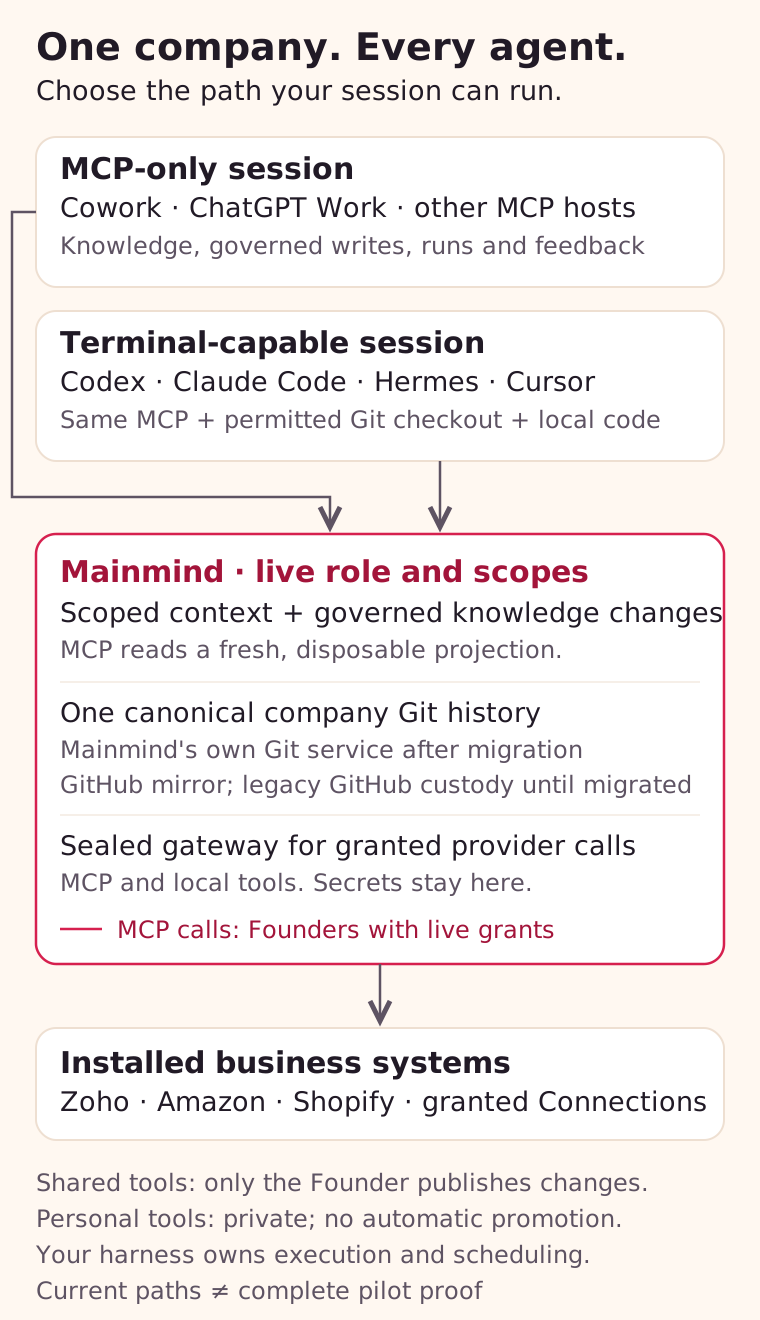
The sections below are for the acting agent or a person configuring an AI app. Read an applicable Process when a task needs one; an empty space does not need a business Process invented merely to connect or save basic work. Keep secrets out of prompts and saved knowledge. Mainmind supplies context and records; it does not start a host or schedule the agent.
Choose by the tools actually enabled in this session, not its product name. A chat host can have other execution capabilities; here MCP-only means deliberately using only Mainmind's exposed MCP tools.
Path
What the agent uses
Start here
MCP-only
Knowledge, runs, governed knowledge changes and feedback; granted provider calls for an Owner
Any client with remote MCP enabled and no checkout
Git plus MCP
The same Mainmind connection, plus a permitted checkout and a terminal for local tool code
A terminal-capable host
Host-specific connect steps are below, because those commands differ.
Live ops boards (Slack, cron health, a vendor dashboard) stay out of Mainmind until they are deposited into the space's knowledge or reached via call_provider on a connected account. Mainmind does not mirror those boards.
Owner provider access: Use the exposed list_provider_connections, then call_provider for an installed, granted provider — unless the System record's tool-route names a CLI for that act, in which case follow the CLI and do not invent a gateway call. To attach a write to an open task, pass that task's run_id and control_key. Omit run_id for an independent operation receipt, with no run_start or run_finish. Before a write, choose a unique operation_key; repeating that key returns recovery information without sending again, including after a timeout. Do not mint a new key to recover. Inspect the receipt and verify the provider object. Recovery is not a cached response or proof of success. This uses the same gateway as local tools without a checkout, terminal or extra credential. It does not execute local tool code. Read the Process and provider instructions before a call; written knowledge and a connection list are not live business evidence. If a required manual or tool is unavailable, report the gap instead of guessing.
Terminal-capable hosts can use installed, granted provider adapters through Mainmind's HTTP gateway. Check the issued capabilities: tool files do not grant provider access. A teammate's member lease currently carries no vendor capabilities; a co-owner's carries what the Owner's carries. Neither path has a blanket promise that every provider operation or fresh client installation has passed acceptance.
Connect once per client
Use the complete space URL from Accounts in your space:
https://mainmind.app/mcp/<space>
If any space placeholders remain, replace them with the identifier shown in Accounts before copying commands or prompts. This page fills them in when you are signed in to exactly one space; if you hold several, choose the intended one yourself. Name the connection Mainmind — <space>.
The relative path /mcp alone is not a complete URL. The full address https://mainmind.app/mcp is the one to use if you keep more than one space: it asks which space to connect, then lists the others this connection could reach so you can tick the ones it should. It holds the ones you tick and serves one at a time, switched with use_organization; tick none and it is fixed to one space, like the URL above. Prefer the complete space-specific URL when a connection should never reach anything else. Do not use a Git clone URL, an app page, or a GitHub URL. Pasting the URL into a conversation does not install a connection. Verify the returned identity rather than trusting the display name you typed.
Complete Mainmind's authorization in the browser your harness opens: continue with GitHub. An invited member does this too, not a repository token — the first time, open the Owner's invitation link once to bind this GitHub account to the membership; every connection after that is the same GitHub sign-in. No GitHub repository access or vendor credential belongs in a consumer setup.
Keep existing client configuration; add one entry rather than replacing a configuration file. If Mainmind is already configured by a plugin, reuse that connection instead of adding a duplicate. Never copy tokens, invite codes or lease exports into chat, screenshots, Git or shared configuration.
A connection that names no scopes follows that person's live role, including team administration for an Owner; the consent screen shows the role before anything is granted. Existing limited grants stay limited until reauthorized. The authentication guide explains consent and migration.
For persistent agents, authenticate the person once and use distinct stable profiles through that role-following connection. Each supported call selects the exact profile; the profile adds no permission and never turns into a separate login. Persistent agents owns registration, sync and presence. Ordinary chats and temporary helpers do not create profiles.
Legacy machine members with independent mmkey_ credentials remain supported for static-bearer and API runners through the machine connection flow. Never copy a person's OAuth token into such a runner. Do not reuse an MCP session ID across sessions; a run and its private control key stay with the session that opened them.
Reads overlap. Knowledge tools marked read-only (boot, search, read_node, and the others with readOnlyHint) prove they read one projection generation and do not take the exclusive workspace lease. Two agents can read at the same time. If a publication lands mid-read, Mainmind discards the mixed result and retries once. You may still see "the projection was republished while this read was in flight"; retry the call.
Notes and routine task work overlap. You can save or retract a note, record an event, start a task, send its heartbeat, or finish it while another agent lands or deposits knowledge. Each save checks the publication and your live access. A task cannot finish while one of its own writes is still in flight. Completed calls with uncertain effects remain partial evidence in its closing receipt. An unrelated task does not block it.
A refusal can report that no handler started while its receipt cancellation remains unconfirmed. Retain the private recovery token from that response and pass it as receipt_recovery to run_finish for the named run. A declared task still requires your control_key. For a task-free call, supply the control_key if the refusal returned one; otherwise use its original session. Keep the token if recovery is also unconfirmed. This settles only the refused reservation; it cannot cancel an effect that actually started.
Canonical writes can still conflict. While a landing, deposit or other governed change holds the workspace lease, a competing call waits a bounded time for that holder. If the lease is still held it returns Another organizational knowledge call is still finishing: projection is busy with mcp:<tool>. Wait for that call, then inspect before retrying. If a ledger response says the change was saved or its outcome is unconfirmed, inspect its note, event or run first. Retain any returned task receipt and private control key. Mainmind never replays a write automatically. A typed deposit releases its lease after Git confirms the save, while knowledge refresh admission continues separately. Keep the saved receipt: it does not yet prove the new knowledge is readable. Separate machine members preserve ownership; they do not bypass conflicts on the same canonical repository. A pending canonical landing releases the lease while Git finishes and returns a landing_id. Poll checkout_change_status with that id; Git still checks for competing changes before saving.
A rebuild pauses knowledge. While a projection refresh is in progress, knowledge-dependent tools refuse with projection refresh in progress for <commit>; no partial knowledge was returned. Wait until the new commit is serving. Do not answer from memory.
Provider calls are not that lease. list_provider_connections, call_provider, issue_tool_permit and feedback do not take the knowledge-projection lease. call_provider writes still use operation_key. Error shapes are on Sign-in and errors.
Codex
Codex supports plugins. Before changing MCP configuration, run:
Terminal
codex plugin list
If it lists mainmind@mainmind, reuse that installation and skip the direct MCP and manual-skills setup below. The plugin packages a Mainmind server entry and the boot skills. Do not add the same server or copy the same skills again.
If the plugin is absent, install it. Codex reads the Claude Code marketplace in codeyogi911/mainmind-plugins and installs plugins/mainmind with its skills. The first two commands were run in a clean home with Codex CLI 0.156.1; the third opens Mainmind's sign-in in your browser:
If codex mcp login stops with "missing required issuer", your Codex is older than 0.156.1. Upgrade Codex and run the login again.
For the connection alone, without the skills, run codex mcp add mainmind --url https://mainmind.app/mcp in place of the two plugin commands, then the same codex mcp login mainmind.
The plugin's server entry is named mainmind and uses the general address, so sign-in asks which space to connect. To pin one space, add the remote server yourself on the host where Codex runs instead:
You do not choose permissions. Mainmind's sign-in page shows your role in that space, and after you allow it the connection can do what your role can do, and follows your role if it changes. To give an assistant less than your role on purpose, see limited connections.
Alternatively, merge this entry into your Codex configuration, then run the login command. Use this instead of adding the same server twice:
Codex's local clients share configuration on the same host; a separate remote host is a separate setup. A cloud task must actually expose the connection; local settings alone do not prove that. Official Codex MCP guide.
To add the boot discipline without a plugin, copy the contents of codeyogi911/mainmind-plugins.agents/skills/ into the repository's .agents/skills/, or into ~/.agents/skills/ for every project. Each skill must end up at .agents/skills/<name>/SKILL.md; copying the directory onto itself gives .agents/skills/skills/<name>/SKILL.md, which Codex does not read. Official Codex plugin guide.
Installation, account connection and intended persistent work are separate. After either setup route, open a fresh task, check /mcp in the CLI or the app's connection controls, complete OAuth if needed, then call whoami and boot. Those calls prove that this task reached the intended Mainmind account and space. Installing a plugin alone does not authenticate an account or establish persistent work. The task keeps the account's real identity and permissions; a standing agent's identity and activity require separate verification. See Persistent agents.
Claude Code
Add a user-scoped HTTP server, then open Claude Code and use /mcp to complete its authentication flow:
Terminal
claude mcp add --transport http --scope user "mainmind-<space>" "https://mainmind.app/mcp/<space>"
User scope makes this entry available across your local projects. A shared project entry is a different choice; do not distribute authentication material with it. No Mainmind plugin is required for the plain remote MCP path. Official Claude Code MCP guide.
The plugin is the other route, and it adds what the Mainmind connection cannot: the skills that tell an agent to try a checkout before working through Mainmind, and how to read a start-of-day brief.
From a terminal, the same two steps are claude plugin marketplace add codeyogi911/mainmind-plugins && claude plugin install mainmind@mainmind.
For the connection alone, without the plugin, run claude mcp add --transport http mainmind https://mainmind.app/mcp, then use /mcp to sign in. It asks which space to connect.
The @mainmind suffix names the marketplace the plugin came from. The bare /plugin install mainmind usually resolves too, but only once that marketplace has been refreshed, so the qualified form is the one to follow.
It ships no secrets; you still authenticate as yourself. The plugins live in codeyogi911/mainmind-plugins, a separate public MIT repository. They used to live in Mainmind's own repository. If you installed from that path, point the marketplace at the line above instead; the old location no longer carries them.
Cowork and Claude chat
In Claude's Customize → Connectors, add a custom connector with the full space URL, connect it and complete Mainmind authorization. A Claude Team or Enterprise owner may need to add the connector first. Enable it for the particular conversation, then use the thin-client prompt. These are account-managed remote connectors, not a local server entry in a desktop configuration file. Network reachability from your laptop alone does not prove the remote connector can connect. Official Claude connector guide.
ChatGPT and ChatGPT Work
Where your plan and workspace allow custom plugins, OpenAI's current documented setup is Settings → Security and login → Developer mode, then the plus button in ChatGPT Plugins. Create a connection using the full Mainmind space URL and complete authorization. In a new conversation, select the plugin from the composer's + → More menu. Official connection instructions.
For a Work task, verify that Mainmind is available in that task's actual tool list before starting. Availability depends on plan, workspace policy and surface; a successful setup in Chat does not prove Work access. If the custom connection option or tools are absent, ask the workspace administrator to enable the supported route. Do not substitute a local secret or another provider connector and call that an MCP-only Mainmind test. Official Work access guidance.
Hermes
Merge the following into ~/.hermes/config.yaml, then start hermes chat and complete the first connection's OAuth flow:
A remote/headless host may need the callback setup described by Hermes; do not paste authorization callbacks into an agent prompt. Verify the connection, then use the terminal prompt below if that Hermes session has a terminal. Official Hermes MCP guide.
Cursor
The plugin is the first route, because it brings the skills with the connection. codeyogi911/mainmind-plugins lists plugins/mainmind-mount in .cursor-plugin/marketplace.json, and that directory carries both Cursor's .cursor-plugin/plugin.json and the Agent Plugins 1.0.0 plugin.json, sharing one mcp.json and one skills/. It is public and MIT, so using it needs no access from us.
On a Cursor team. An admin opens Dashboard → Plugins & MCPs, chooses Add Marketplace, then Import from Repo, and pastes https://github.com/codeyogi911/mainmind-plugins. Members then add Mainmind from Plugins. This is also the route for Grok Bot.
On your own. Copy that directory to ~/.cursor/plugins/local/mainmind, then restart Cursor or run Developer: Reload Window, and check Customize lists it:
On Windows, copy the contents of that same directory, including the .cursor-plugin folder, into %USERPROFILE%\.cursor\plugins\local\mainmind, so that plugin.json sits directly in that folder.
Or merge a remote MCP entry into .cursor/mcp.json for a project or ~/.cursor/mcp.json for your user, then authenticate through Cursor's OAuth controls:
Other clients implementing the Agent Plugins standard can load the same directory; agent-plugins.org has the install route for each. Cursor is reported to prefer its own OAuth flow over a configured headers entry when a server publishes authorization metadata, which Mainmind does; treat OAuth as the route here rather than planning on a static header. Anyone who connects with the entry above is offered their own role on Mainmind's consent screen; for an Owner that covers list_members and team management. An older limited grant without mainmind:team.read cannot call list_members. Mainmind cannot silently widen that grant. Disconnect and connect again without naming scopes to follow your role. Then register or reuse the intended profile through Persistent agents. A static-bearer runner still uses the separate machine-member flow. Official Cursor MCP guide.
Grok
Four surfaces, four setups, one Mainmind connection. A limited grant without mainmind:team.read cannot call list_members. Signing in offers your own role on the consent screen. Grok web or Build can register or reuse an owner-connected profile through Persistent agents. A custom API runner without OAuth uses the separate machine-member flow.
Grok on the web. Open grok.com/connectors, choose New Connector, then Custom, enter the complete space URL, and complete Mainmind's authorization in the flow Grok opens. xAI's custom-MCP page says a server requiring OAuth or API keys completes that flow in Grok after the URL is given, and that the server must be reachable over the public internet, which Mainmind is. xAI documents this screen for the web; whether the iOS and Android apps expose the same one is not something its docs state, so this guide does not claim it. On Grok Business and Enterprise a team admin with Team Read-Write adds the connector before members can use it. Official Grok connector guide.
Grok Bot in Cursor. Grok Bot is Cursor's assistant, and it adds tools only as plugins: from Cursor's public Marketplace, or from a team marketplace an admin set up. It inherits the team's Cursor connector policy. So on a Cursor Teams or Enterprise plan, the admin imports Mainmind as described under Cursor, and each person then selects Plugins in Grok Bot, adds Mainmind and authorizes it in the browser. On a personal plan Grok Bot cannot add Mainmind until it is listed in Cursor's public Marketplace, which it is not yet. Official Grok Bot plugin guide.
Grok Build, the coding agent. The plugin is the first route, because it brings the skills with the connection. Grok Build loads plugins from ~/.grok/plugins/, so copy plugins/mainmind-grok there as mainmind, restart Grok Build, check /plugins lists it, then open /mcps and sign in:
Grok Build also reads Claude Code plugins, so if Mainmind's Claude Code plugin is installed on that computer, /plugins may list it already. Official Grok Build plugins guide.
For the connection alone, add the remote server, then complete the browser flow it opens on first use:
The Grok plugin lives at plugins/mainmind-grok in codeyogi911/mainmind-plugins, public and MIT. It carries the server entry and the skills/ that give a Grok Build session the same boot discipline the Claude Code plugin installs — including trying a checkout before working through Mainmind, which matters here because Grok Build has a shell and the connector surfaces do not. It is its own directory rather than shared with the Agent Plugins one under Cursor above, because the two ecosystems spell this server's transport differently and one directory holding both spellings is a trap rather than a saving; that repository's README is the file that tracks what each Grok surface actually reads. xAI indexes plugins in its own catalogue, xai-org/plugin-marketplace.
An entry there names a repository and a full 40-character commit sha, and may add a path naming the directory inside it that holds the plugin, which is how a plugin in a subdirectory is listed. Several live entries are that shape, one of them a plugin under plugins/<name> in a multi-plugin repository — the layout the repository above uses. So listing Mainmind needs no second repository and no copy vendored into xAI's own: the entry points at plugins/mainmind-grok in the repository above, at a pinned commit, and the skills stay single-sourced there.
That path key is absent from xAI's written schema, which documents path only for vendored entries. It is validated for remote sources by the catalogue's own validator and honoured by its index generator, and the entries using it are the evidence; this is read from that code, not from xAI's documentation.
Mainmind is not listed there yet, so today you copy plugins/mainmind-grok as above, or use the grok mcp add command.
Grok Build keeps the resulting tokens itself and also reads Cursor's .cursor/mcp.json. If you already configured Cursor on that host, look for the entry you have before adding a second one. Official Grok Build MCP guide.
A bot you build on the xAI API. Pass the Mainmind connection as a remote MCP tool with server_url, server_label and authorization. That field takes the raw credential, not a header value: xAI writes the Authorization header itself, so a value beginning Bearer arrives doubled and Mainmind refuses it. That surface runs no OAuth, so it cannot use an owner-connected profile through a person's connection. It needs its own scoped legacy machine identity. Use the machine-member flow, then configure the runner with that member's credential. Never Mainmind's deployment credential, and never a person's token. Start by naming the read set and widen it once the bot behaves — the field is allowed_tools on the OpenAI-compatible Responses API shape and allowed_tool_names in xAI's own SDK, so check which one your client speaks rather than assuming. Official remote MCP tools guide.
Muse
Muse is Meta's assistant, and it takes connectors. Add one yourself with the complete space URL. The Mainmind connection is an OAuth 2.1 server, so connecting means completing a browser authorization; Meta documents nothing about what its connector screen supports, so treat that step as unverified until you have done it once. Meta does not review connectors added this way, so you are trusting the service directly.
Muse is a connection-only surface: no shell, no filesystem, no Git client, so no checkout. read_node, search and call_provider are the whole surface, and an agent there should say plainly that it is working only through the Mainmind connection. The space's own command-line tools, under tools/, are invisible from it — which is not the same as absent.
Meta publishes no connector manifest format and no developer documentation for the directory programme, so codeyogi911/mainmind-plugins carries plugins/mainmind-muse as the connection itself plus the submission dossier, rather than a file shaped like a manifest nobody reads. Muse platform.
Set up by pasting one prompt
In a host that can edit its own configuration — Grok Build, Cursor, Claude Code, Codex — paste this and let the agent verify the connection. Then continue with one useful task. Replace the space placeholder first if this page has not filled it in for you.
Add Mainmind as a remote MCP server in this client, then verify it.

Add one entry named "mainmind-<space>" pointing at
https://mainmind.app/mcp/<space> over Streamable HTTP. Use this
client's own documented MCP configuration. Do not invent a configuration
format and do not replace a configuration file: merge one entry. If an entry
for this URL already exists, keep it and go straight to verification.

Authentication is OAuth. Open the sign-in flow this client provides and let me
complete it in the browser. Never ask me to paste a token, an invite code or
any credential into this conversation, and never write one into a
configuration file, a commit or a log.

Then verify and report exactly what you find. Call whoami and state the
space and my live role. Call boot and state the commit it names. If the
space is not <space>, stop and say so without reading its
knowledge.

Do not read or summarize knowledge in this task: making the connection
and proving the identity is the whole job. If a step fails, report the exact
failure and what remains unverified instead of working around it.
A chat surface cannot install its own connector. On Grok web, Cowork, Claude chat or ChatGPT, add the connection through the settings screen named above first, then use the thin-client prompt.
Other harnesses
For any other host, use its documented remote Streamable HTTP MCP + OAuth setup with the same URL. This guide does not claim universal compatibility. If a host supports only a static bearer, it needs a separately provisioned scoped legacy machine identity (mmkey_) and can start over HTTP (GET /api/boot); owner-connected profile selection is not an HTTP bearer contract. Never use Mainmind's deployment credential. If it cannot connect, report that limit and use a supported host rather than weakening authentication.
Try a thin client now
Paste this into a fresh MCP-only session. It tests knowledge, the run ledger and an optional permitted provider read; it does not authorize invoice, stock or other business-system changes, or a test Record in the knowledge repository.
Use only the connected Mainmind MCP for this task. Do not use a terminal,
local files, web searches, other connectors or remembered facts.

Verify with whoami that the space is <space> and state my
live role. If it differs, stop without reading knowledge. Boot.
Find and read the current Process for reviewing the catalog and closing a
wholesale order. If there is no matching Process,
follow the space's unmatched-task rule; do not invent one.

If my role and tools permit, label this session's run as a read-only
catalog readiness check. From the written Process, explain what evidence
proves an order fully closed, which systems must be checked, and which
actions need human approval. Cite the exact source paths and freshness.

Distinguish written procedures from live business data. Do not claim the
catalog is current or any current invoice, refund or stock balance is correct
unless you actually read the required live evidence through Mainmind.
If I am the Owner and the provider tools are exposed, discover the granted
connections for this run. When the Process and accessible provider manual
establish a safe, small GET request, make one through call_provider and keep
its result and receipt. Do not guess a route, make provider writes or use a
local secret. If a tool, grant or required manual is unavailable, say exactly
what remains unverified.

If Mainmind fails, submit sanitized feedback if available: tool, expected
behavior and actual failure, with no customer data or credentials. Keep
the receipt. If even feedback fails, say it was not recorded.
Close only this session's run truthfully if one was labelled. Return:
what worked, what is blocked, evidence references, and the next safe step.
Success is verified identity, a freshly read Process and a cited readiness check with honest limits. Refusing to invent current business data is correct behavior, not failure. If a tool returns only a card, ask for its text result; if essential fields are missing, report the portability gap. A healthy URL or visible tool list alone is not success.
Try a terminal-capable session
Owner: keep one knowledge checkout
For ordinary knowledge and tool-code work, use the Owner's standing checkout. You do not need to start a business run just to clone or edit files. Paste:
Use Mainmind for <space>. Call whoami and verify that I am the Owner
in that space before reading knowledge. Boot.

Call checkout_canonical_repo without a run id. Follow its returned clone and
credential-setup instructions privately. If this exact knowledge checkout is
already present, keep it; do not clone again or discard uncommitted work.
Read its entry instructions and report the permitted change/landing route.
For this first check, read only: do not change files or call business systems.

Do not display credentials or .git/config. The checkout credential is Git-only,
not a provider permit. Do not close the standing checkout run: that revokes
the reusable checkout. Report what is verified and any exact blocker.
Later, for an authorized change: use an isolated worktree/branch below the returned prefix, review and test it, push, then call land_canonical_change with that branch. If the result is pending, poll checkout_change_status with the returned landing_id; a host timeout is not a failed landing. If the host timed out before any receipt, call land_canonical_change again with the same branch. Verify landing and a fresh read; pushing alone is not done.
Mainmind accepts a push only when it carries one branch, below the agent/<run>/ prefix the checkout returned, whose name uses only - . _ /, lower-case letters and digits. A push that breaks any of those — main, a tag, two refs at once, or agent/<run>/Fix-403 — comes back as a bare HTTP 403 with no explanation. That is the branch rule, not a broken credential. Pushing from a clone that carries another checkout's credential returns the identical bare 403; that one is the wrong credential, and is cleared by rewriting that clone's credential with its own checkout's. A branch already pushed only takes new commits on top: a rebase or force-push to it is refused by name (append-agent-branches), so push the rebased commits to a new branch name below the same prefix and land that one.
Keep the knowledge checkout for the next session. Calling checkout_canonical_repo again renews access to the same URL without invalidating another issued credential. Its Git-only credential lasts up to 30 days and is stored privately in the clone; never copy .git/config into chat or a shared artifact. Rules still need the space's human ruling.
Provider-read preflight: use the files you already have
The standing Git credential cannot call business systems. An Owner with permitted local tool files, or a task that only needs a provider call, can use issue_tool_permit without run_id when that tool is exposed by the live connection. It returns gateway exports, not a repository: nothing needs to be cloned. Use checkout_member_repo only when you actually need the scoped knowledge or tool files.
Check the returned capabilities before calling a provider. A teammate's permit currently grants no provider adapter; a visible tool is not an access grant. This is still local execution through the HTTP gateway, not a provider call performed by an MCP-only client. Paste:
Use Mainmind for <space>. Verify identity; if the space differs,
stop without reading knowledge. Boot, find and read the Process for a
read-only business capability preflight. No task declaration is needed.
If no Process fits, follow the space's unmatched-task rule.

Discover the tools on this live connection. If I am the Owner, use the
exposed issue_tool_permit without run_id when the permitted local files
are already present or the task only needs a provider read. Apply only its
returned gateway exports privately in the tool's shell; do not clone just to
get a permit.

If scoped knowledge or tool files are actually needed, use the exposed
run_start to declare an independent task, retain its private control_key,
then checkout_member_repo with that run_id and control_key. Follow the returned instructions.
Preserve existing files and uncommitted work. Read any checkout's entry
instructions. Never call an absent tool, borrow another member's access, or
use GitHub credentials, vendor .env files or another provider connector.
Keep all permit and lease values private.

Inspect the actual provider read/write capabilities. Run one Process-permitted
read through Mainmind's gateway, only if granted. Record the evidence and
limitations; make no provider writes. If no provider capability is granted,
report that boundary rather than attempting a call.

If a standalone tool permit expires, use issue_tool_permit without run_id
for a fresh independent permit and replace its exports. If a scoped checkout
lease needs renewal, keep the files and use renew_checkout_lease with its
task run_id and control_key instead.
Neither action extends the other credential or the Owner's standing Git
credential. Never reopen or relabel another session's run to gain access.

Report sanitized product failures through feedback and retain the receipt.
If you declared a task, finish only that task with its control_key and a
truthful judgment. Independent operations need no finish. Distinguish permit issue,
clone if needed, knowledge read, provider read and renewal results; do not
call missing evidence a pass.
How work survives the session
Both paths return knowledge to one canonical history. A checkout is a scoped copy, not a second source of truth. In migrated spaces Mainmind's own Git service holds that history and GitHub is a mirror; spaces not yet migrated keep their GitHub-backed path. Neither a local commit nor a push to a run branch alone means a change is on canonical main.
Change
Use the route returned by the live Mainmind connection
Proof to keep
Evidence-backed Record or Lesson
Typed deposit from an eligible open run, within the existing Kind and scope
Returned path plus a successful fresh read; a pending response is not readability
Scoped ledger file in a checkout
Push the permitted run branch, then use the eligible scoped landing route
Owner reviews and pushes from the canonical checkout, then calls land_canonical_change; other members raise the request with ask_founder
Canonical landing, inventory renewal after projection, and a fresh member checkout containing the permitted tool
Personal tool
Its permitted owner's private work
Private is not shared; do not promise unimplemented private sync or automatic promotion
Only the Owner controls shared executable publication, including tools shared with a smaller scope. Others may use permitted shared tools and prepare local experiments, but a local edit is not permission to publish. Owner control of code does not bypass gateway grants or business Authority. Shared-tool proposals and the separate tools-only checkout are retired; do not follow old instructions for submit_tool_change or checkout_tools. Private tool synchronization and automatic promotion are not implied by the Owner landing path.
Read-after-deposit and slow-checkout failures are known limitations. Never retry an uncertain write blindly: inspect the exact path, receipt and run state first. If knowledge is stale or unavailable, preserve that failure; do not substitute an old clone and call it a fresh MCP result.
To test compounding later, explicitly authorize a synthetic Record in a test space and an existing test Kind. Have one session deposit it, then a fresh session read the returned path through Mainmind. Reverse the direction with a permitted checkout ledger change. Do not invent business evidence or use a customer invoice as a write canary.
Login, renewal and approval are different
Prompt or expiry
What it means
What to do
Mainmind sign-in and OAuth consent
Connect one client to one member and space
Check the role shown before you allow it; do not reconnect on every business task
Short-lived access token
The client's renewable connection credential
A compatible client refreshes it without another human login
Owner standing Git credential
Reusable Git-only access, up to 30 days
Keep the clone; obtain another credential for the same checkout when needed. Closing its standing run revokes all credentials it owns
Standalone tool permit expiry
Gateway access for an independent operation, at most one hour; no Git access
Call the exposed issue_tool_permit without run_id for a fresh permit and replace its exports. This does not renew a checkout credential
Scoped checkout lease expiry
The particular open run's Git and granted gateway access
Use renew_checkout_lease for that run; keep local files and replace the old exports. This does not renew a separate tool permit or standing Git credential
Harness tool confirmation
The host's own execution policy
Use its supported per-tool settings; this is not Mainmind login
Business decision
The Process requires a person's judgment
Review the exact Mainmind decision; login never substitutes for approval
Mainmind currently bounds renewable login to an absolute 30-day window; access tokens and checkout leases are shorter-lived. This is not a guarantee of no prompts for a month: revocation, changed scopes, lost client storage or host policy can require attention earlier. Repeated routine sign-ins or a second session breaking the first are product feedback, not reasons to copy credentials around. Keep writes uncertain until verified; never disable all approvals to make a test appear smooth.
Feedback is part of the test
To learn about features you never requested, use release_notes and the product-update workflow. boot includes a short summary; read the full feed and save its completion token for your next check-in.
Use feedback for Mainmind product failures; use the space's knowledge note or learning process for problems in the knowledge. Save the returned product receipt even if GitHub delivery fails. Use feedback_status to see the space's reports and what became of each; if this client does not offer it, say status cannot yet be retrieved here. A product receipt does not by itself prove issue delivery or repair.
The intended closure is report, linked issue, tested fix, verified deployment, then the same scenario rerun by the reporting harness. A saved report, handled status or merged PR is not proof the issue is fixed. The builder loop is not a Mainmind business-orchestration service.
Verification boundary
Client instructions link to the official guides. They are setup instructions, not a claim that this documentation change ran every product against a live space. Always discover the current tools and verify identity in the actual task. The deployed surface describes available routes; an authenticated call and its receipt establish whether your particular session can use them.
Work as a team without a shared task lock
Knowledge reads and provider calls need no task lifecycle. Read the relevant Process and constraints, then work. list_runs shows coordination tasks; include_operations: true also reveals automatic operation receipt locators. run_receipt reads the observed evidence without changing the outcome.
Use run_start only when coordination or a scoped knowledge change needs a task. Each call creates independent work, even on a shared connection. It returns run_id and a private control_key. Keep both with the bot doing the work; pass the key for task updates, completion and explicit task attachments. When the named Process declares Required scopes or Required capabilities, run_start compares them to the Connection lease this member would hold and refuses before opening a run if any are missing or unknown. That lease is transport access, not business Authority. Seeing another task in list_runs does not let a bot finish it. A new run_start call does not close an older task; preserve its returned result. A closing judgment cannot replace the gateway's evidence.
Independent operation permits expire automatically. For a provider artifact or managed restricted-data continuation, pass the operation run_id returned by the preceding call; that uses the original permit, which is not renewed. An expired continuation must be recovered through the provider's workflow, not by replaying an uncertain write. call_provider delivers at most 256 KiB inline. For a larger Amazon document, read it in Range pieces through the same continuation, or run the read from the local CLI with a permit from issue_tool_permit and fetch the Mainmind artifact link it returns over HTTP with that permit.
Use distinct stable profiles when standing agents need distinct attribution through one person's connection. Each supported call carries the exact profile; the shared connection still authenticates as that person and supplies only their current permission. Use separate legacy machine identities only when a static-bearer runner or deliberately independent grant requires one. A display label is not an identity or permission. Your agent team owns the optional portable Role map and host-adapter boundary.